Showing posts with label engineering. Show all posts

Tuesday, December 12, 2023

STEM Lab 23_24 Round 3

We have had another awesome round in the STEM lab. From storytelling with robots to miniature museums, the students have created outstanding projects. 

Kindergarten & 1st Grade

Our youngest Superstars returned to computer programming this round. This time however, there were no screens involved in their coding. Rather, the students wrote programs for a pair of robots; the perennial favorite, Robo-Mouse, and exciting newcomer, Bee-Bot. Students built mazes of increasing complexity for Robo-Mouse to navigate. With the Bee-Bots, students creates sets and costumes and programmed the robot to act out the main events of a story. 

There is a saying of uncertain origin among computer programmers that goes something like this: the good news about computers is that they do exactly what you tell them to do, the bad news about computers is that they do exactly what you tell them to do. Of all the coding activities I do with students, none evokes the spirit of this aphorism more than this robotics unit. The number of times I have heard some variation of the phrase, "I programmed it right, but it's not working" from the students during robot week is beyond reckoning. However, I do not think any unit in the whole of the STEM Lab curriculum I have created more completely drives home for students the importance of clear, orderly commands when coding than this one. 


2nd Grade

One of the best things about being the STEM lab teacher is the mandate to create learning opportunities that allow students to discover the connections between the different content areas. The Math Stories unit is a favorite of mine for a variety of reasons. One of those reasons is that thing I miss about being in a regular classroom is getting to teach books on a regular basis. Another one of the reasons is chance to let students play with and explore math concepts which is sadly not a regular part of the standard issue math curriculum. The books I chose for this year's 2nd grade math stories unit were: A Remainder of One, One Hundred Hungry Ants, Grandfather Tang's Story, and Perfect Square. The first 2 titles explore ideas related to multiplication and division while the other two are an opportunity to play with geometry. 


3rd Grade

Third grade also returned to computer programming this round. This was the first half of a two part project that will combine both digital and physical elements. Inspired by my National Geographic and Lindblad Expeditions Grosvenor Teacher Fellowship this past summer, students researched an arctic animal, taking notes on its habitat, behaviors, and the challenges it faces. They created a Scratch project to share what they learned from their research using pictures from Britannica and National Geographic to illustrate the facts they included. 

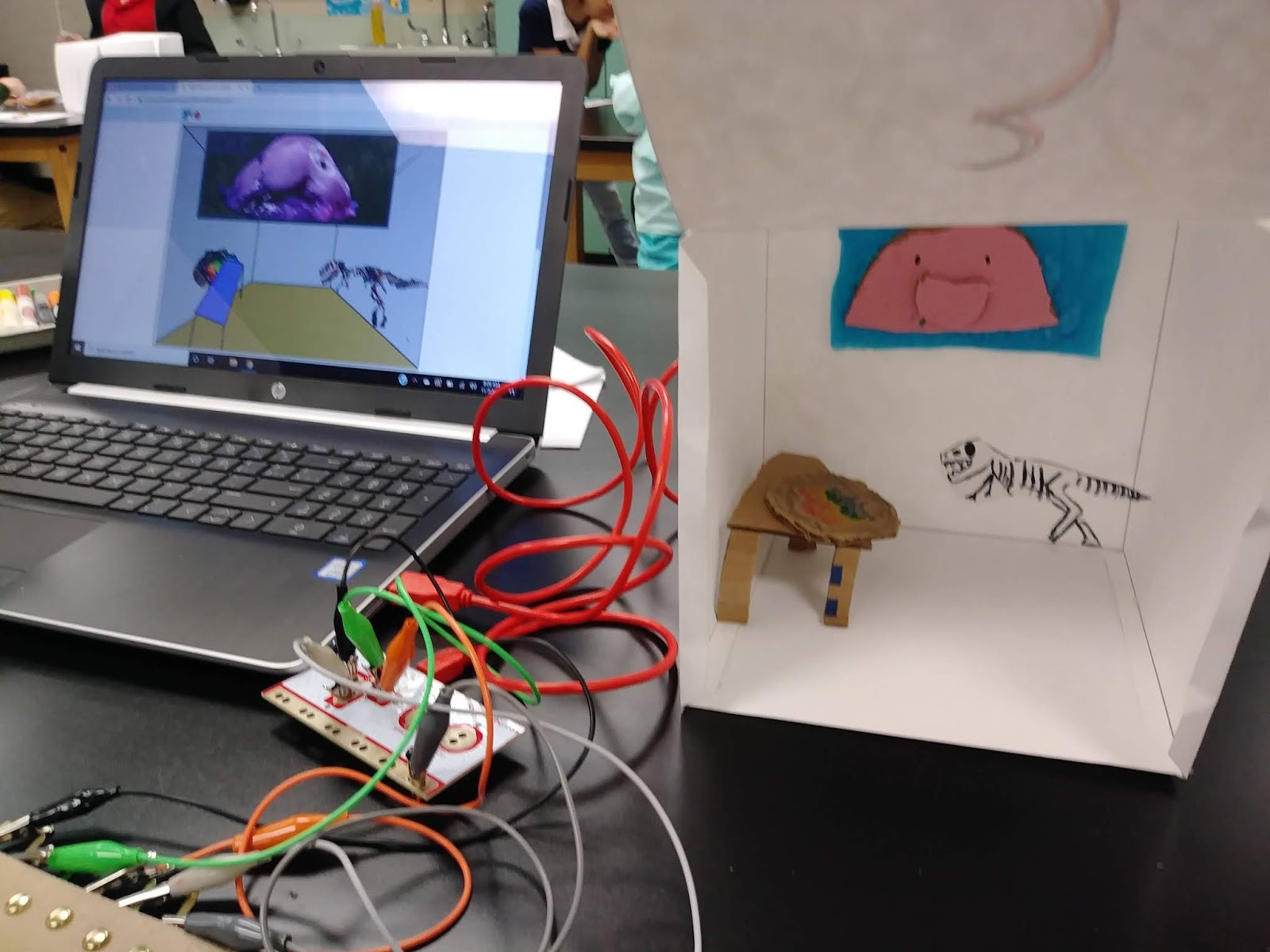
This is the first project that I have the students do in which they use Scratch to create a product with a specific purpose. It is when I teach them to add pictures to their Scratch programs and when they learn about key press events. In the next round they will create a poster about their selected topic and wire it to a Makey Makey that will allow users to control the Scratch project by touching different parts of the poster. When everything is complete they will share their projects with a visiting class and administrators. 

The Scratch projects are in studio that can be viewed here. Please note that some of these are works in progress.


4th Grade

The fourth grade classes wrapped up their biography projects this round and presented their work to visiting 2nd grade classes. Previously the students researched the life and contributions of a chosen historical figure. They had a variety of choices ranging form artists and composers to inventors and scientists. In this round the students put the finishing touches on the Scratch projects they created last time in the lab and built a model of their subject using a plastic bottle, cardboard, and construction paper. At the end of the week they connected their models to their Scratch projects with our old friend Makey Makey and presented their finished products. Not only was I proud of the amazing job the 4th graders did explaining their work to our visitors, but I was so impressed with how the 2nd graders grilled their hosts with questions about the historical figure, the working of the Scratch project, and how the model was constructed. 


5th Grade

The 5th grade also completed the second half of a larger project this round and presented their learning. This project too was inspired by my Grosvenor Teacher Fellowship expedition. Students researched the arctic ecosystem and the issues facing the natural and human communities of the region in the previous round and programmed a digital museum room using Scratch to share what they had learned. In this round they constructed a miniaturized physical version of their digital museum exhibit. The door to this model was wired to a Makey Makey so that opening it triggered the Scratch project to begin narrating the contents of the museum. At the end of the week the students shared their work with visiting first graders and administrators. 


Monday, May 31, 2021

Winding Down This Most Peculiar Year

My best intentions for keeping a schedule of posting have come to naught under the weight of other digital responsibilities. That is not to say however that we have been idle in the STEM Lab. Quite the contrary, we have been designing, programming, and building up a storm. 

So here is the short version of what the various grade levels have been up to these last couple of months. 

Kindergarten & 1st grade

We spent several weeks exploring the nature to be found on campus. Students used their senses (not taste) to make and record observations about the living and non-living natural things they saw. We walked around campus noting the different types of trees, the birds, and even visited the habitat to see the pond. One of the most exciting things was getting to monitor the progress of a robin nest in a crepe myrtle outside one of the kindergarten classrooms. We made leaf rubbings and created pictures using natural materials as well.


The next unit was a return to computer programming. However, the focus this time was on creative computing rather than solving puzzles as we do in Code.org. We used the language Scratch Jr. for its ease of use. Each class began with a guided lesson followed by an independent practice challenge. Once students had completed the challenge they were invited to create their own programs with self designed characters and backgrounds. One of my main goals for the lab is that students see computer programming as a tool for self expression and sharing their learning. I start teaching them that lesson early and I am endlessly impressed with their creativity.


2nd grade

One of my favorite things to do with my second graders is to introduce them the "real" Scratch. Most of them have been using Scratch Jr. since kindergarten and stepping up to the full version make them feel like they are now the big kids. This was a 2 part unit (on account of the fact that I only have one week with the class rather than two. The first week was guided practice using the various commands and relating them to the Scratch Jr platform that they are familiar with. The second week involved planning and then programming an "All About Me" project in which clicking each letter of their name shared something about them.


Second grade's final unit of the year is, like their introduction to Scratch, about preparing for next year's STEM Lab projects. This one aims to develop the students' cardboard engineering skills. In the lab, our primary building material is cardboard. It is plentiful, easy to work with, and sturdy enough to build large structures. The students practiced constructing models using L-braces, flanges, and slotted pieces before combining these methods into a stabile. I have discovered that most students do not know how to effectively use liquid glue, so that is another one of the goals of this unit.


3rd Grade

The third graders also experienced a 2 part unit, this one involving the BBC Micro:bit device. This is a microcontroller that students program using a block-based language called MakeCode. The first week was spent becoming familiar with the various inputs and outputs found in the Micro:bit. The primary inputs students learned to use are buttons, the accelerometer (tilt sensor), and the I/O pins. They used these inputs to trigger outputs to the 5x5 LED screen and sound effects played through an add-on speaker board. The next time they visited the lab, students built a model animal with cardboard and construction paper and incorporated a Micro:bit running a program of their own creation to make their animal interactive.


The last 3rd grade STEM Lab unit was an introduction to the concept of "broadcasts" in Scratch. A broadcast sends messages between different elements of a program allowing the students to coordinate their these elements to create projects of greater complexity. Here are a couple examples.


4th grade

Our 4th graders spent a few extra units on Scratch this year. We were involved in piloting lessons and activities put together by the Creative Computing Lab at the Harvard Graduate School of Education. These projects seek to develop students' coding skills while also developing their creative confidence. One of my overarching goals in the lab has always been to make students comfortable with open-ended tasks with many possible solutions. The general emphasis on standardized test results tends education toward standardized answers. Students display this training by point at whatever they are working on and asking, "Like this?".  A collection of the projects they created for these units can be found here: When Clicked, Broadcasts, Ask & Answer

After so much computer programming we took a break to do some purely physical making. This was the "biography bottles" research project. Students researched an important figure from the sciences. They then built a model of that person with plastic bottles, cardboard, and construction paper. They completed their display with a timeline of significant dates in that person's life and a notecard detailing their contributions and accomplishments.


The 4th grade is finishing the year setting up a project for next year when they are in 5th grade. My wife is also an elementary STEM lab teacher (at another school of course) and in 2020 we were awarded a summer study grant from Fund for Teachers, an organization that funds self designed professional development experiences for teachers. Our grant will help us visit the Galapagos Islands to create a model GeoInquiry project based on the framework created by National Geographic. This type of project engages students in geographic thinking and encourages them to take action to improve their communities. Students have been researching things to see and study in the Galapagos and will begin writing questions for us to ask the naturalists and guides we meet with on our expedition.

5th grade

My 5th grade students are often "asked" to be a beta testing group for new STEM lab units and this year is no different. Related to the aforementioned GeoInquiry project related to the Galapagos, I want to include GIS mapping next year when we review the data related to our expedition. Never having used this kind of technology with students, I wanted a test drive. I find 5th graders to be brutally honest about what works and what does not when given the chance (and when they trust the teacher enough to be honest with them). We worked with a number of resources including surveys and map explorations. I am extremely grateful for the feedback the students provided. Another part of this unit was a set of Skype-a-Scientist meetings. They facilitate connections between scientists in a variety of fields and classroom teachers. 


The 5th grade finished the year with a couple units based on art. In the first they used their skills in Scratch to "hack" a famous work of art. The result is a painting that one can interact with by clicking the different parts. Here are a couple examples: 


The other art-meets-programming project used Turtle Art, a language based on Logo that allowed students to draw with code. This drew (haha) not just on their knowledge of coding, but on their geometry skills as well. I was quite impressed with the things they were able to make.

So there you have it, everything we have been up to the last few months. It is certainly been a strange and taxing roller coaster of a year and I certainly hope that the 2021-2022 school year will be a bit more normal. 

Check here for updates on the Galapagos expedition.

Have a wonderful summer!

Sunday, February 23, 2020

Let the Games Begin!

The cardboard arcade has become a yearly fixture in the STEM lab calendar for 3rd grade. I place this in the third grading cycle because it usually has an extra week and few interruptions to the schedule.

We start with a brief overview of what exactly is an arcade. I always include both definitions (covered passageway lined with shops AND place to play games for a fee), because I see myself as a teacher of all subjects. Then we watch and discuss the Nirvan Mullick film Caine's Arcade which is the original inspiration for the whole cardboard arcade phenomenon. The movie documents the arcade built by a 10 year old boy who was spending the summer hanging around in his father's auto parts store.

Next students get together in teams, or elect to work independently, and brainstorm ideas. I place as few limitations on them as I am able. The games must be table top size and must be playable by first and second graders. I encourage the students be be as creative and not just make a replica of an arcade game they saw at Dave and Buster's. Once an idea is selected, students begin planning in their journals. These plan include a list of materials, steps for completion, and direction for how to play the game. I insist on a detailed plan because I find that it cuts down on the amount of materials that are wasted. During the planning phase I meet with each group to offer feedback on their design. Depending on what they are trying to make, I ask questions to get them thinking about the details that will need to be included. That may be "how will you build the ball return?", "how will you stop the ball from flying across the room?", or "how will player know they have won?".

The construction and testing phase lasts several days. While I do help with some of the tougher cutting tasks, I make the students do as much of the hard work as possible. Last year I banned the use of tape in construction because it is wasteful and fails to hold the game together anyway. I spend a lot of the building class periods teaching students to use white glue and structural elements like L-braces and flanges to attach pieces of cardboard to one another. There is much gnashing of teeth in the beginning when I refuse to produce a roll of tape for them to mummify their project with. However, once a few students get the hang of the glue techniques, they are eager to share their skills with others.


The final phase of the project is always the presentation. I invite a class from a lower grade to come and play the games. I never know who will be available from which grade level, so I prepare the 3rd graders for the fact that they may end up entertaining anyone from Kindergarten through 2nd grade. They are always so excited to show off what they have made and the only disappointment ever voiced is that I did not invite their former teacher or the class with their sibling to participate.

There have been some really great projects so far in this unit including a 3 story escape room game, a pinball machine, and a nicely done soccer/hockey mash-up game.


Friday, November 22, 2019

Morning at the Mini-Museum

This rotation in the STEM Lab has 4th grade working on a project that combines digital and physical elements to make an interactive display. I adapted this activity from one done by a teacher I know in Virginia. (Link to her project guide is below.) I was overly ambitious in my additions for the first group, so some adjustments and refinements were necessary after the first class completed their projects.


On the first day of the unit, students went on a virtual field trip to the Smithsonian Museum of Natural History. The "wandered" around the museum recording observations in their journals regarding the things they saw, how the objects were displayed, and anything else that they found interesting. We followed up with a discussion about what the purpose of a museum is. The students gave several great responses including: "so people can learn and discover things", "so people can see things they have never seen", and "so people can learn about life in the past". That day finished with students brainstorming a list of things they would include if they could design a room in a museum.


The next day, I explained the project to the class. They were to plan a museum room that included 3 objects of their choosing. Each person would build a model of their imagined room using the STEM Lab staples of cardboard, glue, and construction paper. Students would work with a partner to use Scratch to program and digital version of each partner's room that used by key press events to switch between rooms. The rooms are narrated giving at least 2 facts about each object included. Finally, the model museum rooms would be linked via the Makey Makey to the team Scratch project so that when the door to each room is opened, it causes that part of the program to run.


I gave the students a fair bit of leeway in what they added to their museums. This was so that they could include objects representing personal interests and passions. The only requirement was that they be able to give two facts about each object in their rooms. It has been interesting to see what objects the students have included. Some rooms are full of fancy cars or sharks, while others have favorite foods and athletes. The attention to detail that several students added to their physical models. As always, I have been really impressed by how the students helped each other to complete the elements of the project on time. For some, the coding comes more naturally and for others it is the building. I love how they all work together to ensure that everyone's project is finished on time.

I try to mix it up each year in the lab and to not repeat projects too often, but I am loving this one so far and can it it becoming a regular part of the lab curriculum.

The guide by Kathleen Fugle is here: Tiny Museum on Instructables.

The gallery of our projects is here (more added soon): Mini-Museum rooms.


Sunday, April 21, 2019

Imagining Adaptations

Fourth grade's final rotation in the lab for the school year begins with research into the Earth's biomes. Students started with some note taking on BrainPop and identified the different biomes and the variations in climate and elevation that define them. Next, students formed teams, or elected to work alone, and were randomly assigned one of the biomes. They continued their research using BrainPop along with National Geographic resources and online encyclopedias to learn about the plants and animals that inhabit the biome they were assigned. In particular they were to find the adaptations that organisms in that biome use to survive. The information collected was organized into a table showing the name of the organism, the adaptation, and the role that adaptation plays in keeping the organism alive.

Up until this point, I did not tell students what they would actually be making in this unit because I did not want the product to influence their research. However, with the note taking portion of the project complete, it is time to outline their task. The challenge is to imagine an organism that lives in the biome they were assigned with a focus on giving it the adaptations it needs to survive there. Students planned their organism in their journals complete with labeled sketches highlighting the adaptations. With their plans complete, students used the STEM Lab standard materials of cardboard and paper scraps to build a model of their imagined organism.

Students spent several days working on this part. One of the things I have been focusing on getting the children to understand when they are making things is that just because we are building with trash, it doesn't have to look trashy. It is sort of like a neatness counts idea, but really it is more about getting them to slow down and take their time. Their project being done well is more important than it being done fast.

The final step was for the teams to make a small model of their biome to to display their model in. They also filled out a display card to accompany their work. I invited one of the first grade classes to the lab to visit the imaginary menagerie and the fourth graders had to discuss their projects for a younger audience.

This was a new project for the lab and I am generally pleased with how it has gone so far. However, for future iterations, I am planning on direction students to include at least one adaptation from different categories into their imagined organism. That is, an adaptation for dealing with the climate, an adaptation for getting food, and adaptation for defending itself, and so on. As it was, many of the projects so far have focused on adaptations for doing just one of those things and I want them to think about adaptations helping organisms do all of things they need to survive.


Sunday, February 17, 2019

Animated Artworks

It has become my habit in the STEM Lab to experiment, so to speak, on the 5th graders. When I devise a new project or new activity or practice, I find it useful to try it out on the group of students who will have gone on to middle school next year. That way, the necessary tweaks and alterations can be made for the following year. This unit is not entirely mine as much is adapted from a number of different activities I have seen done by my various Twitter friends.


Having said that, this is very much an experimental unit in which the 5th grade has been working. It is no secret that I do all that I can to bring concepts and skills from other subject areas into my lab projects. I have wanted to implement a unit with a fine arts focus for a while, and I felt like the 5th graders finally had the requisite physical computing skills to be successful. The project involves students creating their own interpretations of a famous artist's work, both digitally and physically.

Students started by doing some research into the life and work of a particular artist. The first two rotation groups got Vincent Van Gogh (because the first group was shorted 3 days due to various interruptions) and the third group is at work on Claude Monet. (I have not settled on an artist for the last group, yet.) These were chosen because they have a wide range of works to choose from. Students selected a work and sketched it into their notes. This gave me the chance to teach some basic drawing techniques which was a novel experience.


Next, students used Scratch to create an animated version of the painting they selected that also shared information about their artist. First they had to download an image of the painting. We used Wikimedia Commons for this because the images are free to use with attribution (which is another thing I have been working to get students in the habit of, citing their sources). They then uploaded that image into Scratch as a background. All of that is something they have learned previously. The next bit, however, took a little practice. They uploaded the image of the painting again, this time as a sprite and used the paint editor tools to erase most of the painting, leaving only the piece they intended to make move with code. In Van Gogh's "Starry Night" this may have been the moon or the clouds, in Monet's "Tulip Field" it was the flowers or the windmill blades. That sprite was then placed exactly over its corresponding place on the background so that it would only appear as a separate element when then triggering event key was pressed. Students repeated this process until they had at least 3 different animated elements in their chosen work. They also added a sprite that told about the life and work of their artist.

Here are a few example projects:
Van Gogh, Irises
Van Gogh, Starry Night
Monet, Boat on the Epte

The second part of the unit moved us into the realm of physical computing with the Raspberry Pi. First I introduced students to the Explorer HAT add on board. It is a self contained set of inputs and outputs capable of running both LEDs and motors. It has a small breadboard (which students learned to use last year) on top for building the circuits. Students are able to program the lights and motors using Scratch, albeit an older version which takes a bit of getting used to for them. Armed with their upgraded skills, students worked in teams to use the Scratch paint editor to create a digital interpretation of their chosen painting. This too takes some practice, but it also allows them to get creative with how they accomplish the drawing. Some use the shape drawing tools and fill them with color, while others use the line drawing tools. Meanwhile, the other partner is drawing the same painting on paper with colored pencils and markers. Both drawings done, the physical and the digital, teams added 2 LEDs to different places on their drawing, wired them to the Raspberry Pi, and programmed them to light up on different key presses. They also drew and cut out a detail from their painting, attached it to the the axle on a motor, and added the motor to the drawing as well. This was programmed to spin on a key press. The lights and motors matched elements in their digital drawing that they had animated on screen, similar to what they did during week 1. They also added a sprite to talk about the artist and the painting.
At this point the rotations are about half over and I am generally pleased with how it has gone so far. I think for the future I will create a gallery of paintings and artists for the students to choose from. Hopefully that will lead to a greater diversity of projects in the gallery.